

Pokematix Damage Calculator User Guide
Pokematix is a web application that makes it easy to calculate damage in Pokémon Champions.
This guide explains the basic workflow, from calculating attack damage to consecutive attacks by multiple Pokémon, entry hazards, and counter moves.
Run a basic calculation
Choose these three items to display a result:
- The attacking Pokémon
- The defending Pokémon
- The attacker's move
The result updates automatically whenever you change a selection.
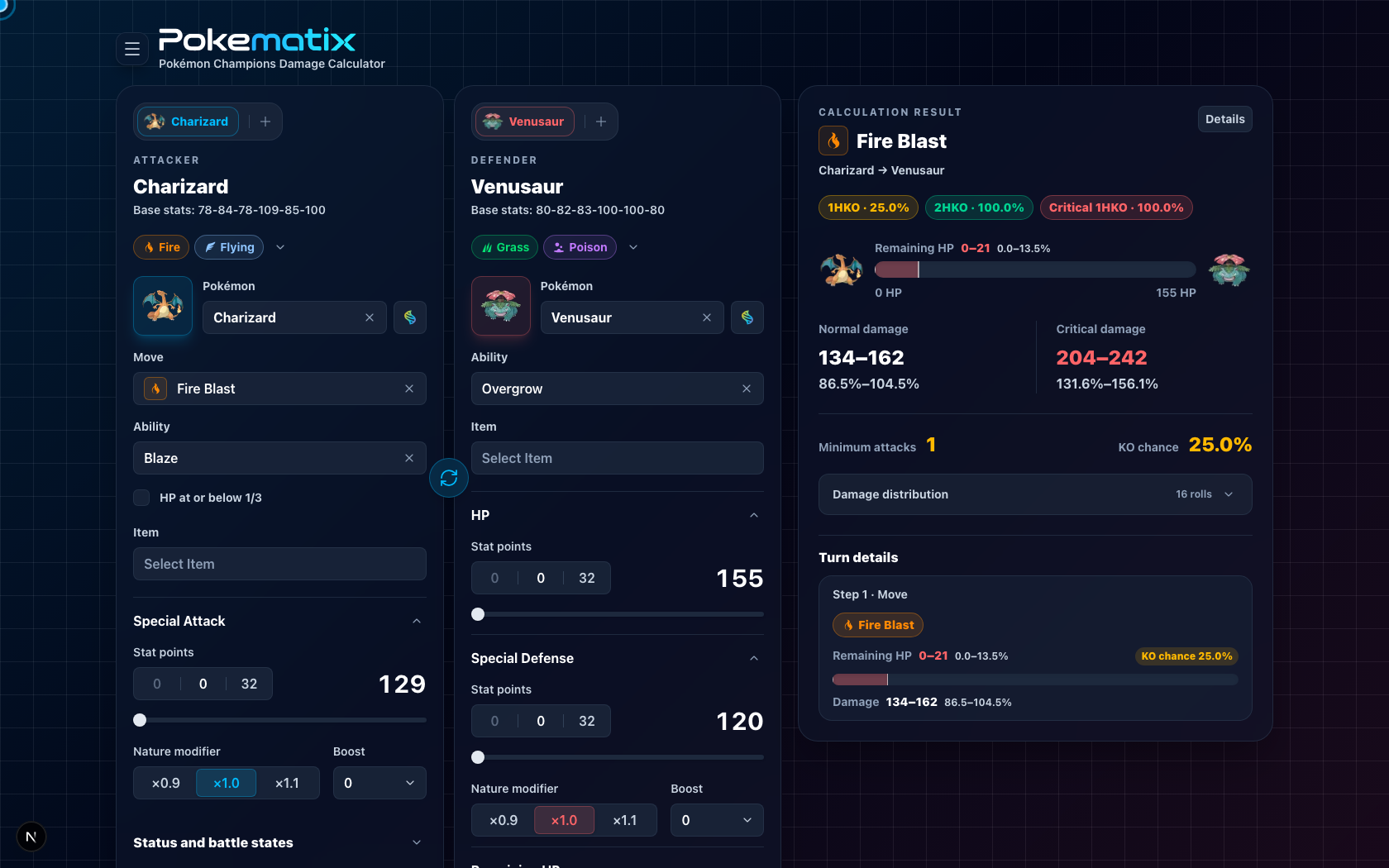
On a wide screen, inputs appear on the left and the result appears on the right. On narrower screens, a compact result stays at the bottom of the screen.
Configure the attacker and defender
Pokémon, move, Ability, and held item
For the attacker, you can select:
- Pokémon
- Move
- Ability
- Held item
For the defender, you can select a Pokémon, Ability, and held item. Changing a Pokémon updates the available move and Ability suggestions for that Pokémon.
When a form button appears to the right of the Pokémon name, use it to switch between the regular form, alternate forms, and Mega Evolutions.
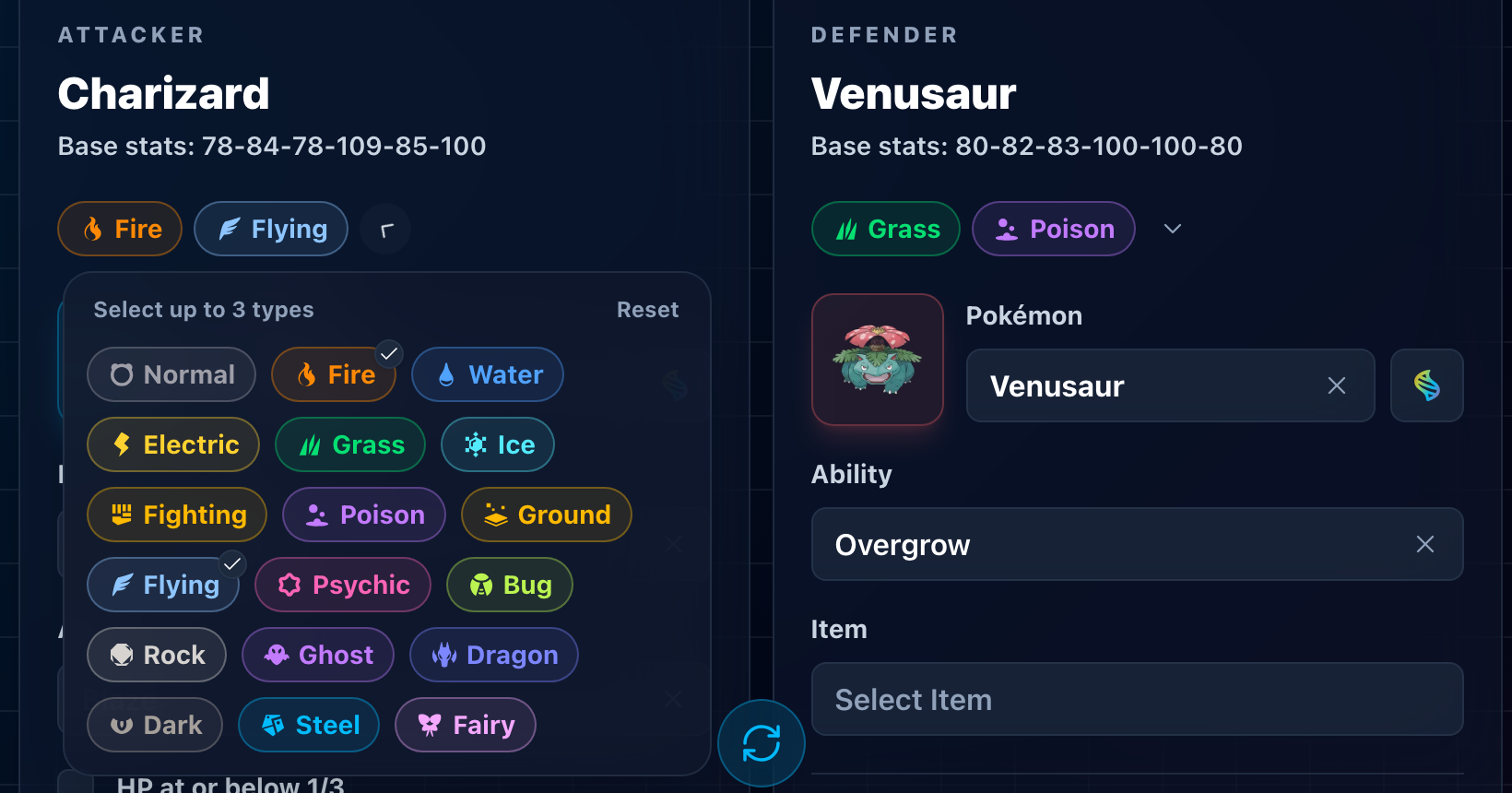
Current types
Open the type controls below the Pokémon name to set up to three current types for the calculation. Use this when a Pokémon's type has changed during battle. You can also reset the selection to its original types.
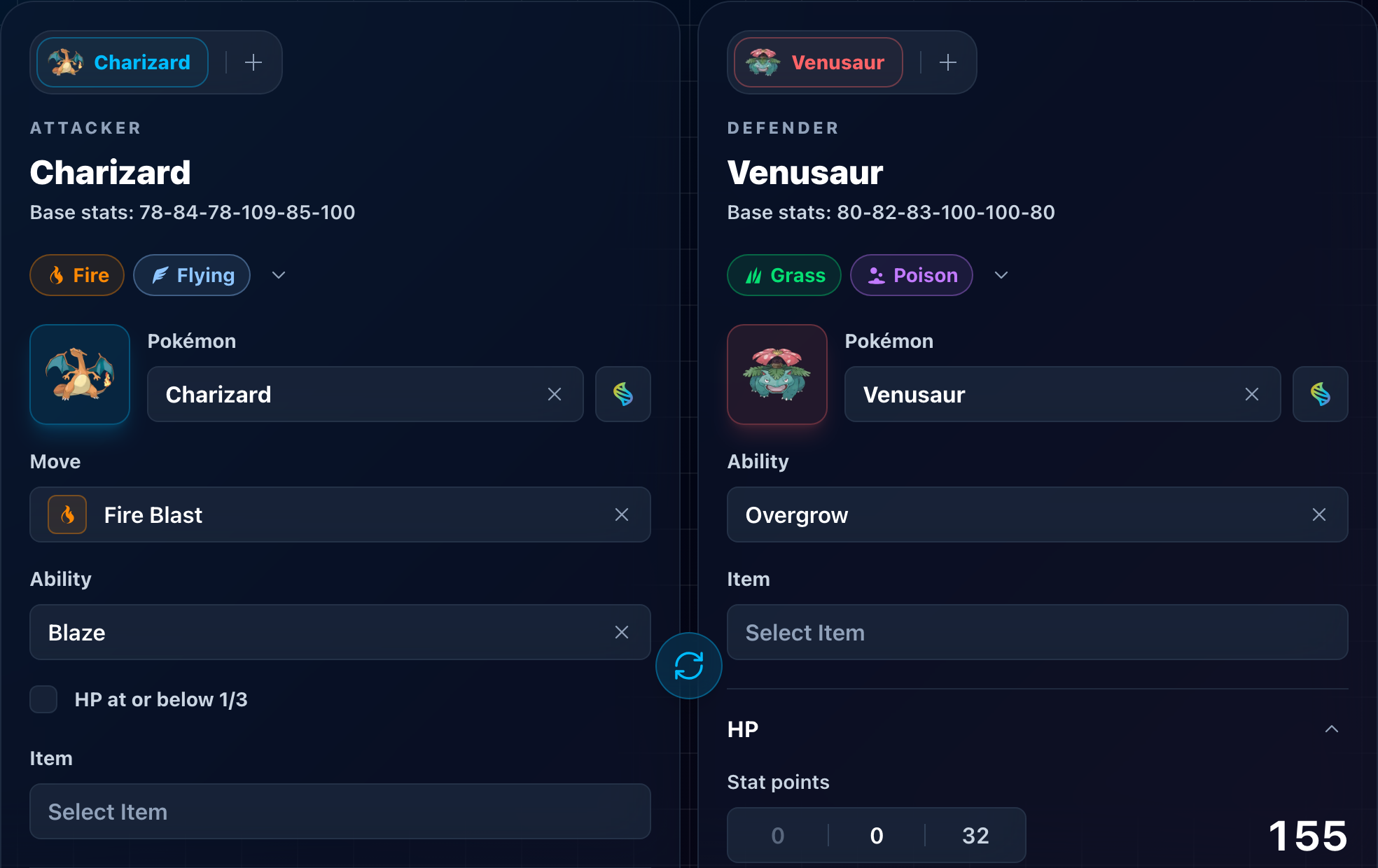
Swap the attacker and defender
Use the swap button in the center to exchange the attacking and defending Pokémon. On mobile, the button appears between the Attacker and Defender controls at the top.
Adjust stats
Pokematix automatically shows only the stats needed by the current calculation. For example, a special move generally shows the attacker's Special Attack and the defender's HP and Special Defense. The fields change when a move or state uses different stats.
Each stat can include the following controls:
| Setting | Description |
|---|---|
| Stat points | Set a value from 0 to 32. |
| Nature modifier | Choose ×0.9, ×1.0, or ×1.1. |
| Stat stage | Choose a value from -6 to +6. |
| Remaining HP | Used by HP-dependent moves and Abilities and as the starting point for an HP sequence. |
The calculated stat appears to the right of the controls.
Set move- and Ability-specific conditions
When a move or Ability needs additional information, its inputs appear directly below that move or Ability. They disappear when they are no longer relevant.
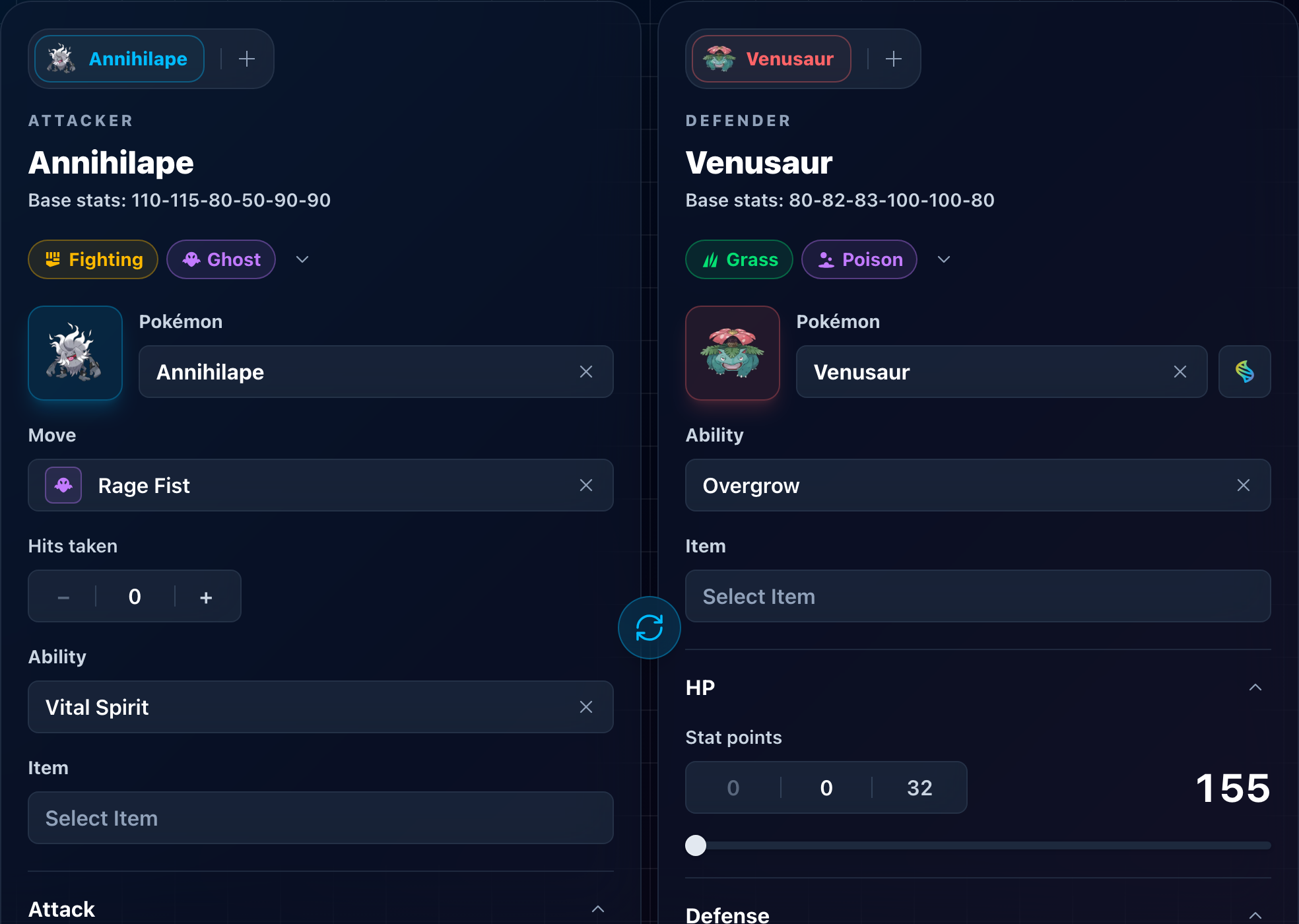
Common conditional inputs include:
| Move or Ability | Additional input |
|---|---|
| Multi-hit moves | Number of hits |
| Beat Up | Participating allies and their base Attack stats |
| Rage Fist | Number of times the user has been hit in this battle |
| Avalanche | Whether the target damaged the user this turn |
| Stomping Tantrum / Temper Flare | Whether the user's previous move failed |
| Payback | Whether the user moves after the target |
| Last Respects | Number of fainted allies |
| Supreme Overlord | Number of fainted allies |
| Analytic | Whether the user moves last |
| Stakeout | Whether the target switched in this turn |
| HP-dependent Abilities | Whether the current HP meets the activation condition |
Selecting a weather-setting Ability, or an Ability that grants a state such as Flash Fire or Electromorphosis, may open a confirmation dialog. Apply also changes the matching weather or state; Cancel selects only the Ability.
Set statuses and field effects
Open the collapsible sections below the stats to configure status conditions and other battle states.
Status and battle states
Available controls depend on the side. They include burn, poison, badly poisoned, Charge, Flash Fire, Helping Hand, Flower Gift, and whether the Pokémon is grounded.
For badly poisoned Pokémon, set the current toxic counter as well. States that affect HP over time, such as Dig, Fly, Salt Cure, and Leech Seed, are also configured here.
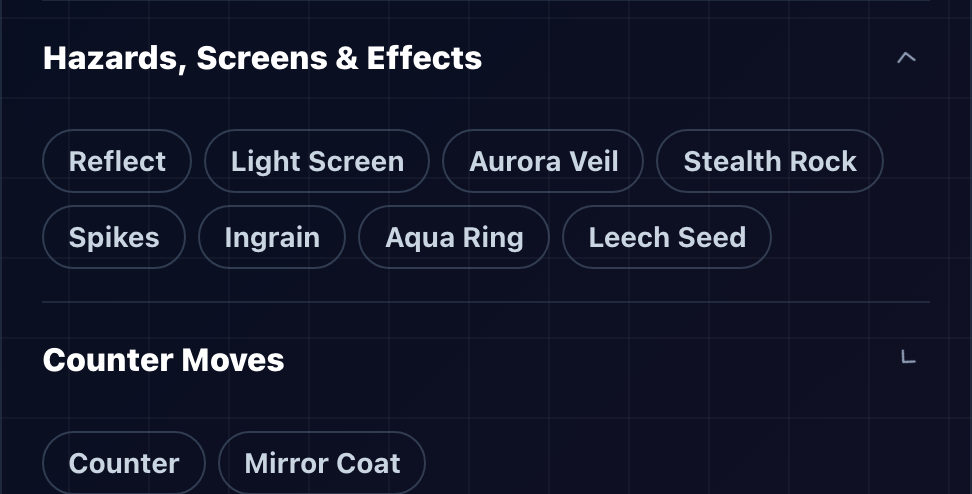
Hazards, screens, and effects
The defender can use effects such as:
- Reflect, Light Screen, and Aurora Veil
- Stealth Rock and Spikes
- Ingrain, Aqua Ring, and Leech Seed
For Spikes, choose one to three layers. Entry-hazard damage appears as a switch-in step in the HP breakdown.
Counter moves
The Counter Moves section appears only when the defending Pokémon can learn Counter, Mirror Coat, or Metal Burst. Only one counter move can be selected at a time.
Set the battle environment
The Environment section below the attacker and defender cards contains conditions shared by every Pokémon in the calculation:
- Format: Single or Double
- Weather: None, Sun, Rain, Sandstorm, or Snow
- Terrain: None, Electric, Grassy, Misty, or Psychic
The battle format affects mechanics such as spread moves and Friend Guard.
Read the result
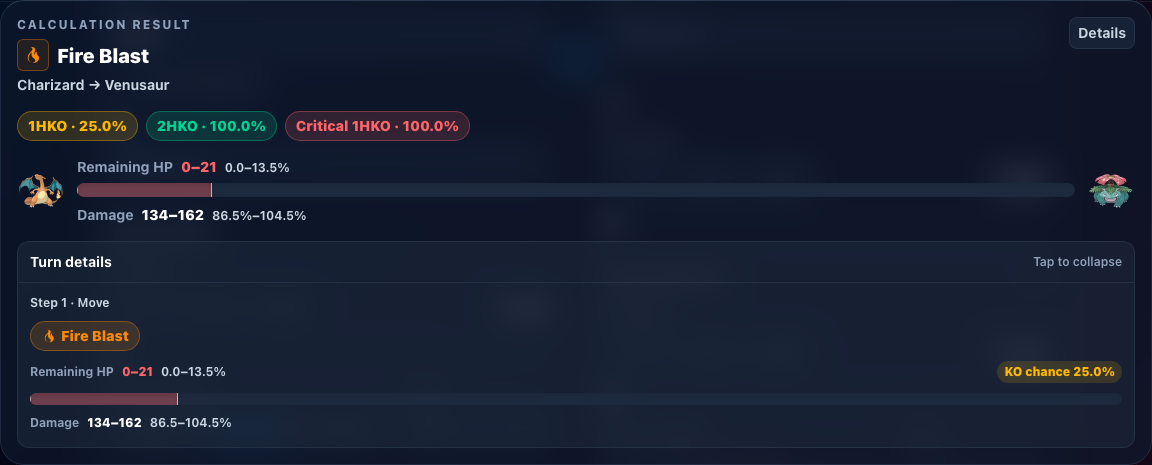
Result summary
The top of the result shows:
- The selected move, attacker, and defender
- Guaranteed KOs, possible KOs, and critical-hit KOs
- Remaining HP and its percentage range after the attack
- Normal and critical damage
- The minimum number of hits needed and the knockout probability
Damage has a random range. For example, 134–162 means the same attack can deal between 134 and 162
damage under the selected conditions. Percentages are relative to the defender's maximum HP.
Open Damage Distribution to inspect the individual damage rolls.
HP breakdown
Open Turn Details to see HP changes as separate steps:
- Entry-hazard damage on switch-in
- Damage from the move
- End-of-turn damage and recovery
Each step shows remaining HP, damage or recovery, and whether the Pokémon survives. When a knockout requires multiple turns, the breakdown repeats the same attack conditions across those turns.
Calculation details
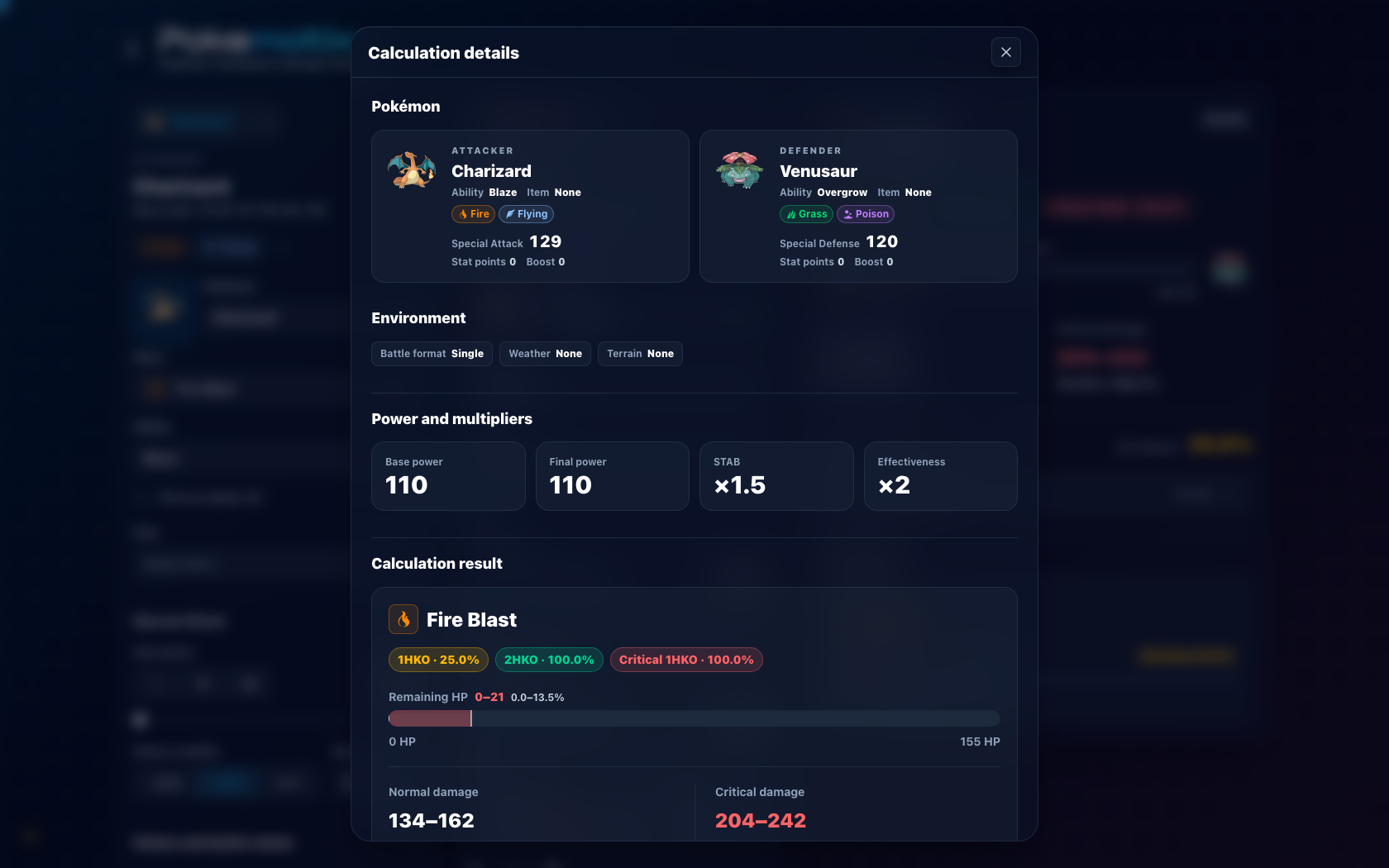
Select Details to review the Pokémon, calculated stats, environment, move power, same-type attack bonus, type effectiveness, and applied multipliers. Use this view to find an incorrect input or an unexpected modifier.
Calculate counter moves
Selecting a counter move for the defender adds a Counterattack result. It also shows a Remaining HP input for the attacker who will receive the counterattack.
- Counter works against physical moves.
- Mirror Coat works against special moves.
- Metal Burst works against both physical and special moves.
The defender cannot counterattack if the incoming attack makes it faint. If only some damage rolls leave the defender alive, the result also shows the probability that the counterattack can activate. An incompatible move category or a knockout is shown as the reason the counterattack fails.
Calculate consecutive attacks
Select the + tab above a Pokémon name to add attackers or defenders. Each added Pokémon has its own
tab and inputs.
- Multiple attackers apply their attacks in order to one defender.
- Multiple defenders are attacked in order by one attacker.
- Only one side can contain multiple Pokémon at a time.
- You can add up to six Pokémon.
In Battle Sequence, use the arrows or dots to move between actions. When multiple attackers target the same defender, the defender's remaining HP carries into the next action. Counterattack damage is handled separately for the attacking Pokémon assigned to each action. The result and breakdown for the selected action are displayed.
Save and share conditions
Automatic browser storage
Pokematix saves the selected Pokémon, moves, and battle format in the browser and restores them the next time you use the same device. To remove that data, choose Delete Saved Data from the Settings menu and confirm the deletion.
Share a calculation
Share Results displays a URL containing the current conditions. Use Copy Link to copy it to the clipboard. A Share button also appears on devices that support the Web Share API.

The shared URL includes the Pokémon, move, stats, states, environment, and multi-Pokémon order needed to reproduce the result. Opening the link restores those conditions and runs the calculation again. Viewing a shared calculation does not overwrite calculation data already saved on that device.
Use Pokematix on mobile
On mobile, the layout changes to keep inputs and results usable in a smaller viewport:
- Switch between the side being edited with Attacker and Defender at the top.
- Tap the compact result at the bottom to expand or collapse it.
- Scroll inside an expanded result to inspect the HP breakdown and counterattack result.
- Search for Pokémon, moves, Abilities, and held items in their dedicated selection views.
Switching sides or expanding the result changes only what is visible. It does not clear your inputs.
Troubleshoot unexpected results
If a move or Ability is not supported, or the result does not match the game, report the attacker, defender, move, stats, and environment needed to reproduce it. A share URL makes the same conditions easier to reproduce.